
Navigating Time Zones While Traveling and Working Remotely
By Rachel Puryear
Time zones might not be at the forefront of your mind as you first set out traveling and earning your living remotely – but they can quickly become quite the puzzle to solve once you’re out there! Between team members and clients scattered across the globe, and moving across time zones, it easily becomes a juggling act to keep up with.
Here are some reliable strategies that you can use while you’re traveling and working remotely, that will help you manage your schedule, and consistently stay on top of things – so that you can start quickly navigating the world’s time zones like a pro:
Understanding Time Zone Basics
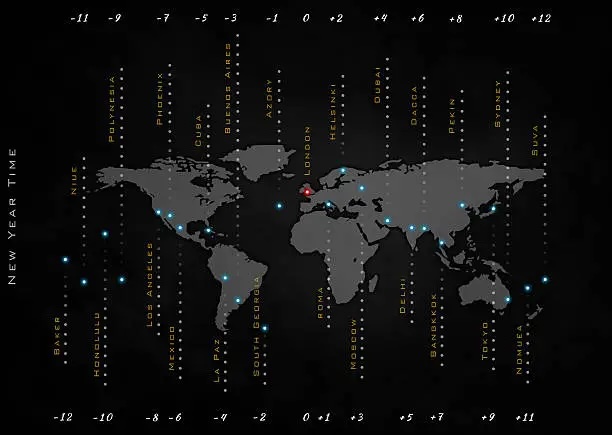
First of all, it’s important to understand what time zones are, and some basics about how they function. Time zones are regions of the Earth which share the same official local standard time. Time zones were created in order to standardize local times, in order to simplify travel and communication between different areas.
Time zones are often expressed in relation to Coordinated Universal Time (UTC) – for instance, UTC+2 is two hours ahead of UTC, and UTC-3 is three hours behind UTC. Countries may also use their own names for a time zone – for instance, the United States refers to the West Coast time zone encompassing California, Oregon, Washington, and Nevada (UTC-8 during standard time) as the “Pacific Time Zone” or “PST/PDT”.
Some countries/regions/states also observe Daylight Saving Time during part of the year, while others do not. In places that do observe it, it usually begins sometime around the start of Spring, and ends some time in Fall. There can be variation in observing Daylight Saving Time, even within the same country. (For instance, within the United States, Hawaii does not observe Daylight Saving Time, and most of Arizona also does not, but the other states do). Within regions that do observe it, this can be noted in local abbreviations for local time – for instance, in the Pacific Time Zone, it may be abbreviated as “PST” or “Pacific Standard Time” during standard time, and “PDT” or “Pacific Daylight Time” during Daylight Saving Time.
Note: UTC does not observe any Daylight Saving Time, and it remains on standard time throughout the year.
Use Time Zone Conversion Tools
There are great tools out there that can help you easily and quickly convert the time between different time zones, so that you never have a scheduling mishap due to time zone mistakes.
Check out the app Time Buddy to help quickly convert time across multiple time zones.
The website timeanddate.com can help you work with different time zones easily, plus a lot of other useful tools (like counting days between events, sunrise and sunset times, weather, and much more).
Many calendars help you work across different time zones. For instance, Google and Apple calendars both allow you to display multiple time zones.
Use Visual Aids
You could create a reference chart that lists the time zones of clients and colleagues, along with their UTC offsets. Timeanddate.com also has a world time zone map that makes for a great visual.
Set Standard Work Hours, if Applicable
If you are responsible for a team in your work, and it is necessary for everyone to work together at times; establish a set of core work hours, where everyone will be available together during those times. That way, there will be some times that people can count on regularly, where they will be able to communicate in real time with their colleagues.
If your team members are in very different time zones, try to “spread the discontent” as fairly as possible, by having some compromises around the hours. For instance, having some team members start a bit on the early side while others work a bit late, is more equitable than having a few work standard business hours while everyone else is working in the middle of their nighttime. If your team has a limited need for everyone to be available at once, and there are big differences in time zones; consider making those core hours apply only occasionally – like once a week, a few times a month, and so forth – rather than all the time.
Adjust Your Schedule If Needed
If most of your colleagues or clients are in a different time zone than you are, then it may be ideal – and worth considering – to adjust your own work schedule accordingly.
Of course, it’s also okay to balance this decision against ensuring that you get proper sleep, have appropriate work-life balance, take care of your own health, and meet your own individual needs.
Communicate Carefully Regarding Times
When scheduling meetings, appointments, and so forth; be sure to mention specific time zones – i.e., “let’s meet at 10:30 am, PST”. This helps avoid confusion over time differences, and who’s supposed to be where and when.
Scheduling tools like Calendly or Doodle can help all participants find a mutually agreeable time, while also displaying all participants’ time zones.
Leverage Technology
Nowadays, there are plenty of good tools to use to help you keep track of different time zones. Definitely take advantage of them.
Apps like Time Buddy; websites like timeanddate.com, everytimezone.com, and Dateful Time Zone Converter; and features in tools like Google Calendar, Apple calendars, Calendly, Doodle, Slack all provide invaluable support in helping you manage working across different time zones.
Use Best Practices All Around
In summary, utilize a few basic principles as best practices, for working with people remotely across different time zones:
- Plan ahead: Always have a clear awareness and understanding of other’s time zones when scheduling projects, appointments, and meetings.
- Be mindful and respectful: Acknowledge the time zones of other colleagues and team members, and clients, and try to accommodate their schedules when feasible – or at least work out a fair compromise.
- Stay organized and prepared: Use any or all of these aforementioned tools and strategies to minimize the impact of time zone differences on your workflow, and also increase morale all around.
Navigating time zone differences effectively while working remotely requires a blend of understanding, technology, and clear communication. By implementing these strategies, remote workers can maintain productivity and strong collaboration while enjoying their travels.
Thank you, dear readers, for reading, following, and sharing. Here’s to knowing what time it is where you are. If you enjoyed this post, please “like” and subscribe, if you have not already.
Check out my other blog, too – World Class Hugs, at https://worldclasshugs.com.
Note: We are a participant in the Amazon Services LLC Associates Program. As an Amazon associate, we earn from qualifying purchases. We appreciate your support!
Remote Income Road Trips Uncategorized Van RV life Wealth business lifestyle productivity remote-work travel

 Free Range Life
1 Comment Leave a comment ›